Shelly 1 Mini Gen4
A compact single-circuit Shelly relay that switches one circuit on and off. The model number on the device is S4SW-001X8EU.
How it connects
It joins your van's network, and Sensa finds it there on its own by checking each address on the network for a Shelly. It works entirely inside the van, with no Shelly cloud account.
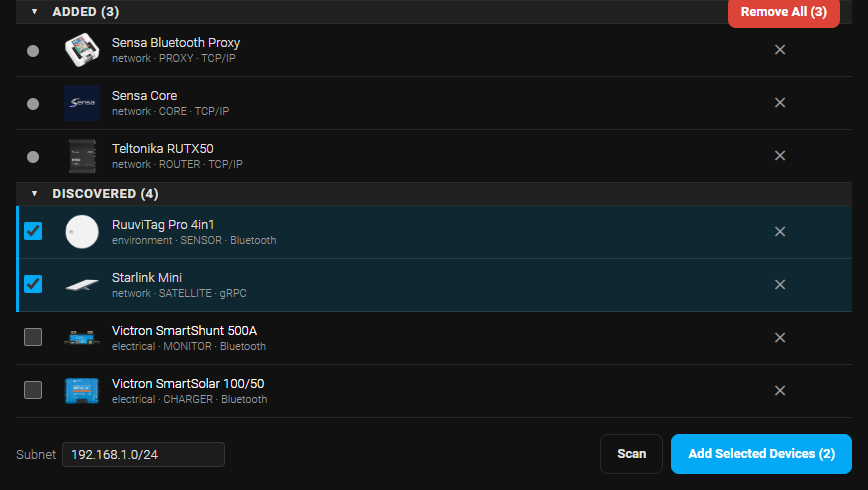
If your Shellys sit on a separate part of your network, change the Subnet next to the Scan button so that it includes that part, or Sensa will not find them.
Add to Sensa Nomad
Before you add it:
- Turn the device password off in the Shelly app. Sensa cannot add a Shelly that asks for a password.
- Give it a fixed address on your router, so Sensa can still reach it if the router hands out addresses again.
Then open Settings, choose the Devices tab, tick it under Discovered and press Add Selected Devices. If it is not there yet, press Scan.
Its circuit starts switched off in Sensa. After adding it, open Settings, find the relay's row and enable the circuit. It then appears on the Switches tab.
See Adding devices for more.
What you see
The circuit appears as an on and off tile on the Switches tab of the Habitation dashboard. This model does not measure power, so the tile shows no reading.
Good to know
- It may show an Unverified label. We have not yet run this model on our bench. See Devices for what the label means.