Van Level Pro 10
The second-generation wired Van Level. Like the Van Level Pro 6 it tells you how to get your van level and how far it leans on the move, and it also measures temperature, air pressure and compass heading.
Available on Vision.
How it connects
The Pro 10 connects with a network cable and takes its power from the same cable (Power over Ethernet). Wireless is not supported.
On your router it shows as ss-vl-pro10-c124-xxxxxx, where xxxxxx is the last 6 characters of the unit's MAC address. Open that address in your browser to reach its web interface, which is useful to check it is running. The user is admin and the password is sensaweb.
Add to Sensa Nomad
Your Van Level arrives with its firmware installed. Once it is on your van's network, Sensa finds it on its own. Open Settings, choose the Devices tab, tick it under Discovered and press Add Selected Devices. If it is not there yet, press Scan.
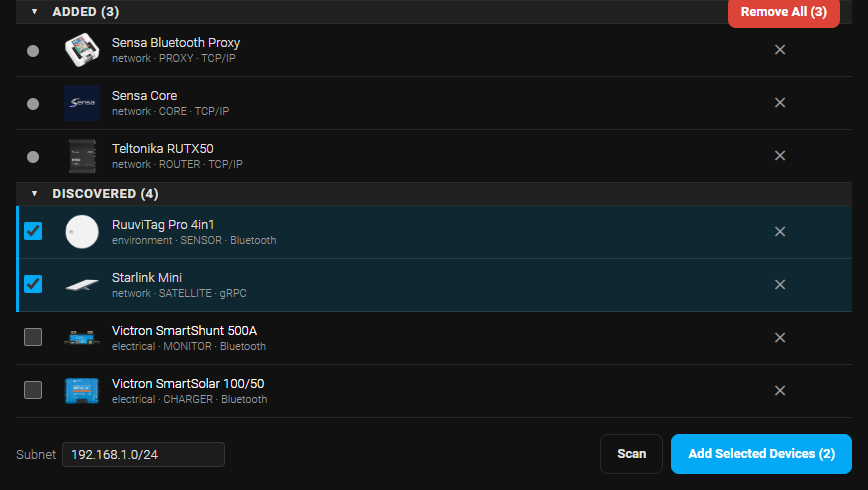
See Adding devices for more.
What you see
- The levelling tabs on the Cab dashboard show how much lift each wheel needs to get the van level.
- A roll tile on Cab Home and a Roll tab show how far the van is leaning to one side while you drive. See Dashboards.
Good to know
- One per system. Sensa takes one Van Level, whichever model.
- Tell Sensa which way it is mounted. Open the cog on its row in Settings, Devices to set which way the unit faces in the van.