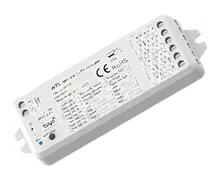
Skydance WZ5 5-in-1 LED controller
A Zigbee LED controller that can drive a plain white, warm-to-cool or full colour strip. Each controller is one light in Sensa, with a card on the Lighting tab.
Sensa Connection Method
Zigbee.
Installation
Connect it to your LED strip, and power it from a regulated 12 V or 24 V DC supply that matches your strip, following Skydance's instructions. Fit it within range of your Zigbee coordinator.
Configuration
The controller uses Zigbee, so you need a Zigbee coordinator added to Sensa first, such as the SMLight SLZB or the Sonoff Dongle M.
Set the mode for your strip on the controller itself, with its match button. The colour of its RUN LED shows which mode it is in. Set it before you pair the controller: it joins as a different device in each mode, so changing it later means pairing it again.
| Mode | RUN LED | For |
|---|---|---|
| DIM | White | Single-colour strip |
| CCT | Yellow | Warm to cool white strip |
| RGB | Red | Colour (RGB) strip |
| RGBW | Green | Colour plus white (RGBW) strip |
| RGB+CCT | Blue | Colour plus warm to cool white (RGB+CCT) strip |
Adding to Sensa Nomad
Open Settings, choose the Devices tab and press Pair Zigbee, then put the controller into pairing mode. Sensa adds it as soon as it joins, and it moves to Added.
If it has been paired before and is waiting under Discovered, tick it and press Add Selected Devices. If it is not there yet, press Scan.
Once it is added, its row on the Devices tab in Settings shows a small dot in the same colour as the controller's RUN LED, so you can check Sensa has picked up the mode you set. If it is the wrong colour, check the right mode is selected on the controller with its match button, then pair it again, as it joins as a different device in each mode. If they still do not match, set Light Type from the cog on its row to override what Sensa Nomad thinks it is.
See Adding devices for more.
What you see
Sensa reads the mode from the controller, and the controller's row on the Devices tab in Settings shows a small coloured dot matching its RUN LED.
The Habitation Lighting tab gets a card with a power button and brightness, plus a warm-to-cool slider or a colour picker depending on the mode. See Lighting.
Good to know
- Controls wrong for your strip? Set Light Type from the cog on the controller's row on the Devices tab. See Correcting it yourself.
- A new batch may not be recognised. It shows as ZIGBEE? and can still be added: pick the Light Type matching its RUN LED. See If Sensa does not recognise your controller.
- Fed from a relay? Power-On Delay and Leave Relay On are on the same cog. See Lights fed from a relay.