Meatpi Wican Pro (OBD2)
An adapter that plugs into your vehicle's OBD2 port and sends engine readings to Sensa over Wi-Fi. It gives the Cab dashboard an Engine tab, and lets several instincts see the engine and the fuel tank.
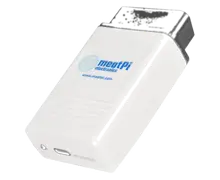
Included in Pro and Vision.
Sensa Connection Method
Network: Wi-Fi.
Installation
Plug it into the van's OBD2 port.
Configuration
It connects to your van's network over Wi-Fi. Sensa finds it once it is sending its readings to your Sensa system.
Adding to Sensa Nomad
Open Settings, choose the Devices tab, tick it under Discovered and press Add Selected Devices. If it is not there yet, press Scan.
See Adding devices for more.
What you see
- An Engine tab on the Cab dashboard, led by large dials for RPM, speed, coolant temperature and fuel.
- Road speed for the Drive mode when moving instinct.
- A fuel level for the Low fuel near a station instinct.
- Engine RPM for the Engine Start instinct.
Good to know
- It sleeps when the vehicle is parked. It can feed the Starter battery watch, but a SmartShunt on the starter battery is the better choice for that, because it keeps reading while you are parked.