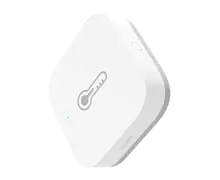
Aqara Temperature and Humidity Sensor T1
A small battery sensor that tells Sensa the temperature and humidity where you put it. This is the T1 model, WSDCGQ12LM.
Sensa Connection Method
Zigbee.
Installation
Install it following Aqara's instructions, within range of your Zigbee coordinator. Mains-powered Zigbee devices pass the signal on, so they extend that range.
Configuration
Zigbee. You need a Zigbee coordinator (SMLight SLZB or Sonoff Dongle M) added to Sensa first.
Adding to Sensa Nomad
Zigbee devices are paired rather than scanned. Open Settings and choose the Devices tab, press Pair Zigbee, then press the pair button on the sensor. If it does not add itself, tick it under Discovered and press Add Selected Devices.
See Adding devices for more.
What you see
- A temperature dial on the Climate tab.
- Its reading in the header bar, if you switch on Show Temperature In Header on its row on the Devices tab. See Dashboards.
Good to know
- Its row on the Devices tab has Fridge, Freezer and Temperature Watch switches, so Sensa can warn you when it runs warm or changes fast. See Climate and food.