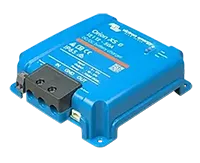
Victron Orion XS
The Orion XS charges your leisure battery from the engine's alternator while you drive. Sensa shows what it is putting in and why it has stopped.
Sensa Connection Method
Bluetooth, or through a Victron Cerbo GX.
Installation
Install it following Victron's instructions, within Bluetooth range of a Bluetooth proxy or the Sensa unit.
Configuration
Over Bluetooth. Sensa needs to be within Bluetooth range, either of the unit itself or of a Bluetooth Proxy near your batteries.
You also need the Orion's Encryption key. In the VictronConnect app, open the Orion, then Settings > Product info > Instant readout via Bluetooth > Show.
If your Orion is wired to a Victron Cerbo GX by VE.Direct, it also appears under the Cerbo with no extra setup.
Adding to Sensa Nomad
Sensa finds it on its own, with a Charger label. Open Settings, choose the Devices tab, tick it under Discovered and enter the Encryption key in the box that appears. Then press Add Selected Devices. If it is not there yet, press Scan.
See Adding devices for more.
What you see
- Input voltage and current, from the starter battery side.
- Output voltage and current, to the leisure battery.
- Charger state, such as Bulk, Absorption or Float.
- Off reason, such as engine off or input voltage too low.
- Signal strength.
Charge a flat starter battery
If the starter battery is too flat to start the engine, the Orion can charge it from your leisure battery for a short while. Victron calls this emergency reverse charge.
You need:
- Orion firmware 1.15 or later. Update it from the VictronConnect app.
- The Orion wired to a Victron Cerbo GX by VE.Direct. Over Bluetooth alone, Sensa can read the Orion but cannot start a charge.
- The Cerbo's software up to date.
- The starter battery voltage set once in VictronConnect, on the Orion's settings. The Orion will not start a charge until it knows it.
To use it:
- Make sure the engine is off. The Orion only offers this when it is not charging from the alternator.
- Open Habitation, then the Electrical tab.
- Press Charge beside the Starter battery on the power-flow diagram.
- A Start emergency reverse charge window opens. Read the warning, tick I understand the feature, then press Start. Start stays greyed out until the box is ticked.
- The button counts down the 15 minutes of charging. Press it again at any time to stop.
- The Orion then settles for 5 minutes with the charger off, and the button shows Ready with a countdown. Start the engine now.
Ready does not mean the engine will start. This cannot restore a damaged or worn-out starter battery.
While Ready shows, the button is greyed out: the Orion will not start another charge until the countdown finishes. If the engine still will not start, wait for it to finish and press Charge again.
The warning covers:
- The starter battery is charged up to 14.4 V (28.8 V for a 24 V starter battery on the Orion XS 1400).
- The charge current is half the Orion's rated current, or lower if you have set a lower current limit.
- The Orion stops taking power from the leisure battery at about 12 V. If it is already at or below that, nothing charges.
- Keep anything running from the leisure battery to a minimum while it charges.
- With more than one Orion XS, start this on all of them or switch the others off first, or they can charge against each other.
- The Orion's settings cannot be changed while it runs.
The Charge button only appears while the Orion says it can charge the starter battery. If you cannot see it, the engine may still be running, the Orion may be in power supply mode, or one of the things above is missing.
Good to know
- Out of range means unavailable. If Sensa hears nothing from the Orion for a minute, its readings show as unavailable until it is back.
- Sensa cannot switch it off. Cold-charging protection can only stop it if it is wired through a relay; otherwise you get the alarm only.
- The 12/12-50 and XS 1400 are bench tested. Other ratings carry the Unverified label for now. See Devices.
- Firmware is updated from the VictronConnect app, not from Sensa.