Victron SmartSolar
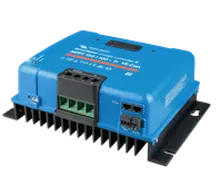
The SmartSolar is your solar charge controller. Sensa shows what your panels are making and how much is going into the battery.
Sensa Connection Method
Bluetooth, or through a Victron Cerbo GX.
Installation
Install it following Victron's instructions, within Bluetooth range of a Bluetooth proxy or the Sensa unit.
Configuration
Over Bluetooth. Sensa needs to be within Bluetooth range, either of the controller itself or of a Bluetooth Proxy near your batteries.
You also need the controller's Encryption key. In the VictronConnect app, open the SmartSolar, then Settings > Product info > Instant readout via Bluetooth > Show.
If your SmartSolar is wired to a Victron Cerbo GX by VE.Direct, it appears under the Cerbo instead, with no extra setup.
Adding to Sensa Nomad
Sensa finds it on its own, with a Charger label. Open Settings, choose the Devices tab, tick it under Discovered and enter the Encryption key in the box that appears. Then press Add Selected Devices. If it is not there yet, press Scan.
See Adding devices for more.
What you see
- Solar power.
- Battery voltage and charging current.
- Yield today.
- Load current, on models with a load output.
- Charger state, such as Bulk, Absorption or Float, and any charger error.
Good to know
- Cold-charging protection can switch a SmartSolar off when your battery is too cold to charge, if it is wired to a Cerbo GX. See Power and electrics.
- The 75/15 and 100/50 are bench tested. Other ratings carry the Unverified label for now. See Devices.
- Firmware is updated from Victron's own apps or VRM, not from Sensa.