Network
Before installing a BlackPaw Control System, a network is required. Depending upon requirements, it can be anything from a basic router to an extensive router and multiple switch setup. Internet is not required for the installation but useful.
-- We ONLY support LTE routers with VLAN capability -- VLANs are an important part of security and for this reason, we do not support any Mifi routers as these typically do not offer VLAN support.
Why Teltonika?
Teltonika routers are our supported, chosen networking equipment, due to
- quality
- automotive design
- wide power input
- API for control
Multi VLANs
All our installations include multiple VLANs for security:
- Starlink is changed to the 192.168.3.0/24 range in the Starlink app so that it does not conflict with our network.
- Cameras should be separated without internet access.
- Guest networks keep temporary users separated.
- Separate Iot protects the Main network if a sensor firmware is cracked.
- Lastly the Main network is free from noise and stays secure for your mobile and laptop sensitive data.
Our default VLAN setup is:
| VLAN | Network Range | Notes |
|---|---|---|
| Main | 192.168.1.0/24 | Admin and secure data network for Core, laptop and phone |
| IOT | 192.168.2.0/24 | Only has access to HA server on Main network |
| Starlink | 192.168.3.0/24 | Reconfigure Starlink to use this range on the Starlink app |
| Camera | 192.168.4.0/24 | No internet access |
| Guest | 192.168.10.0/24 | Only internet access, no access to other vlans |
Configurations
Level 1 - 4G
The following diagram depicts a minimal setup with 4G support. Not all VLANs may be required, depending upon the setup. The camera VLAN is obviously not required if there are no CCTV cameras external or internal. This setup would typically be a mainly Wifi setup with 1 LAN port to be used for our Core unit.
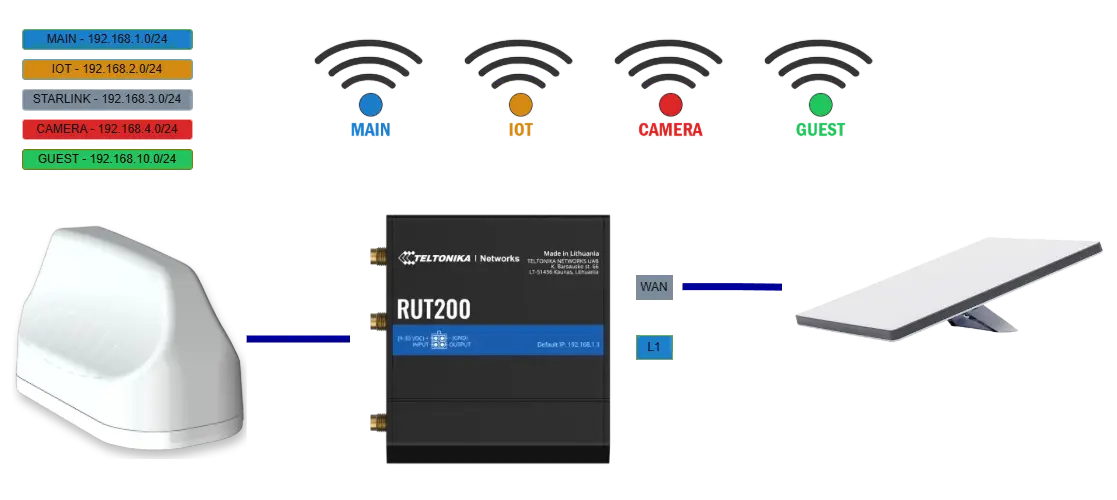
- Teltonika RUT200 LTE Router
- Number LAN Port: 1 Used for Core
- Number WAN Port: 1 Used for Starlink if used
- LTE Support: 4G only
- Multiple SSIDs/VLANS for security
- Optional Starlink Mini
Level 1 - 5G
The following diagram depicts a minimal setup with 5G support. Not all VLANs may be required, depending upon the setup. The camera VLAN is obviously not required if there are no CCTV cameras external or internal. This setup would typically be a mainly Wifi setup with 1 LAN port to be used for our Core unit.
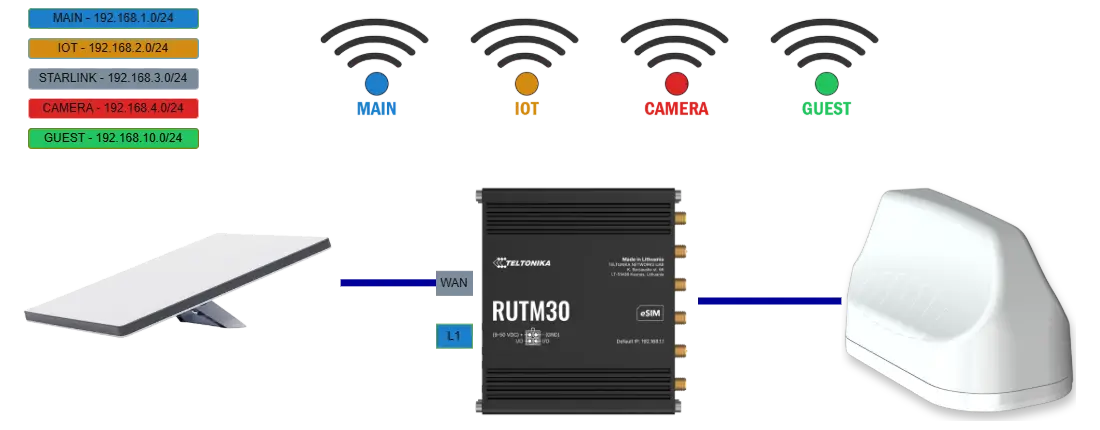
- Teltonika RUTM30 LTE Router
- Number LAN Port: 1 Used for Core
- Number WAN Port: 1 Used for Starlink if used
- LTE Support: 4G and 5G (Reduced Capacity)
- Multiple SSIDs/VLANS for security
- Optional Starlink Mini
Level 2 - 4G
The following diagram depicts an extensive setup with 4G support. Not all VLANs may be required, depending upon the setup. The camera VLAN is obviously not required if there are no CCTV cameras external or internal.
This setup would typically be used in a premium installation that requires wired devices instead of wifi connections and GPS capability. The TSW202 switch allows each port to be tagged for a specific VLAN. The lower TSF000 is a low profile switch which does not support VLAN tagging. This setup is ideal when a smaller switch is required just for IOT purposes on the other side of the vehicle.
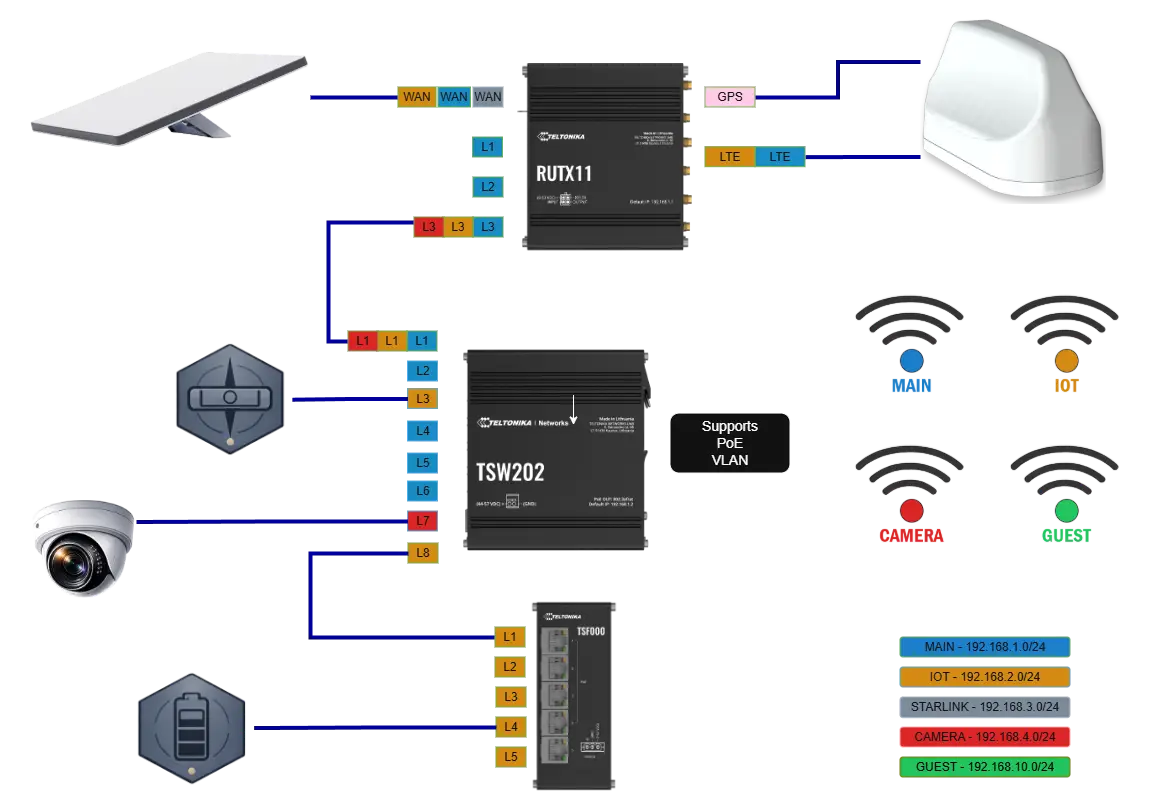
- Teltonika RUTX11 LTE Router
- Number LAN Port: 3 1 Used for Core, 2 remaining ports can be used for Main, IoT or Camera
- Number WAN Port: 1 Used for Starlink if used
- LTE Support: 4G only
- Multiple SSIDs/VLANS for security
- TSW202 switch with VLAN support
- TSF000 low profile switch with no VLAN support
- Optional Starlink Mini
Level 2 - 5G
The following diagram depicts an extensive setup with 5G support. Not all VLANs may be required, depending upon the setup. The camera VLAN is obviously not required if there are no CCTV cameras external or internal.
This setup would typically be used in a premium installation that requires wired devices instead of wifi connections and GPS capability. The TSW202 switch allows each port to be tagged for a specific VLAN. The lower TSF000 is a low profile switch which does not support VLAN tagging. This setup is ideal when a smaller switch is required just for IOT purposes on the other side of the vehicle.
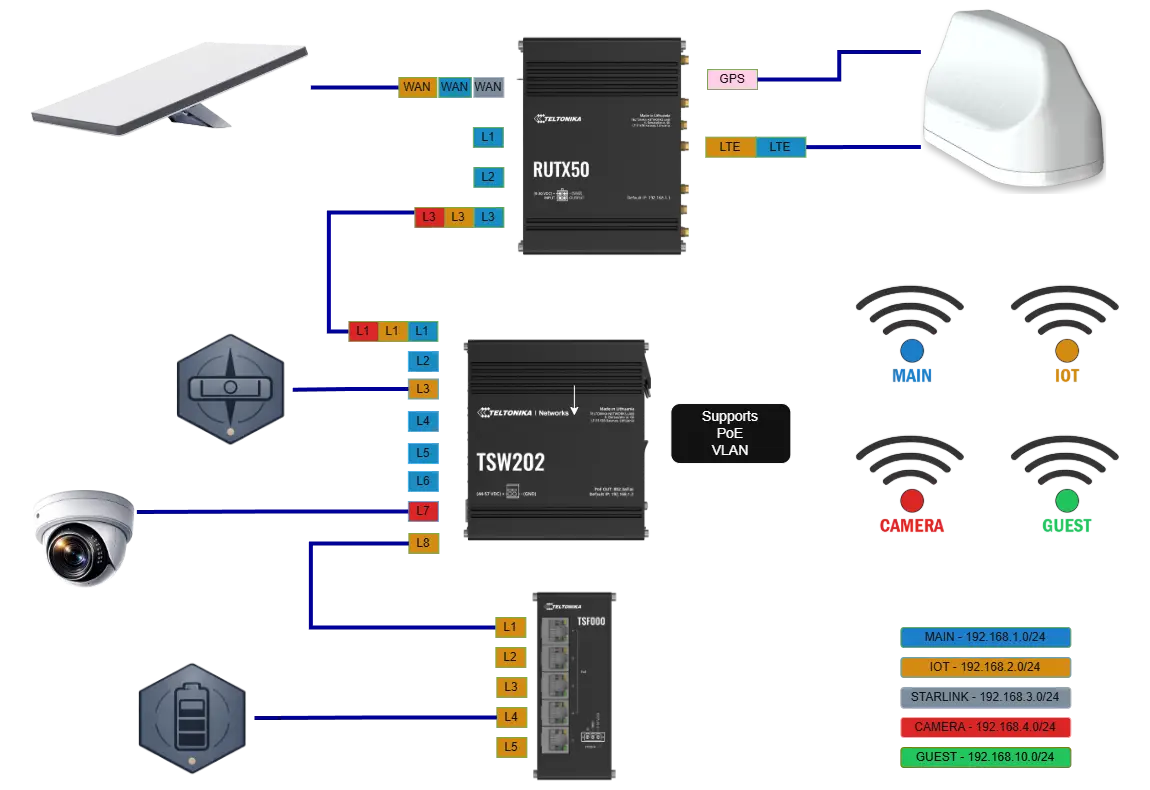
- Teltonika RUTX50 LTE Router
- Number LAN Port: 3 1 Used for Core, 2 remaining ports can be used for Main, IoT or Camera
- Number WAN Port: 1 Used for Starlink if used
- LTE Support: 4G and 5G
- Multiple SSIDs/VLANS for security
- TSW202 switch with VLAN support
- TSF000 low profile switch with no VLAN support
- Optional Starlink Mini